
There are many misconceptions around product teasers – but the most infuriating is that people just think about it as an Explainer video, writ small.
But when you are looking to draw attention to the prospects in the cold layer – it’s not the time to explain everything, but a point to make them curious: the intrigue and momentum with the teaser becomes so big, that it makes them want to click, join, or request access to the product or get enrolled further in the funnel.
IF you do this correctly, you now have a pre-framed prospect, excited about your product and having the momentum to explore the whole thing on a landing page or through a demo process with your team (or by watching a longer, demo video on your website).
So let’s see what makes for a great teaser video.
A Thumb-Stopping Hook (0–3s)
This point has been beaten into the ground, pummeled, raised from the dead, and beaten into the ground all over again.
And for a good reason. A great hook is like a great first date: it signals the beginning of something good to come. Win them in the first 3 seconds, or you will lose the impact for the next 15-20 seconds. As simple as that. With our analytics on YouTube, what we are seeing is that attention spans are getting smaller and smaller.
With one of our most popular examples in Best SaaS Product Launch Ad Video | LangEase,
over the 83,000 views that we’ve received – the average view duration has declined from 36 seconds closer to 24 seconds, so the demand for an even better hook is at an all time high, and it will be getting more and more important as we move into the future.
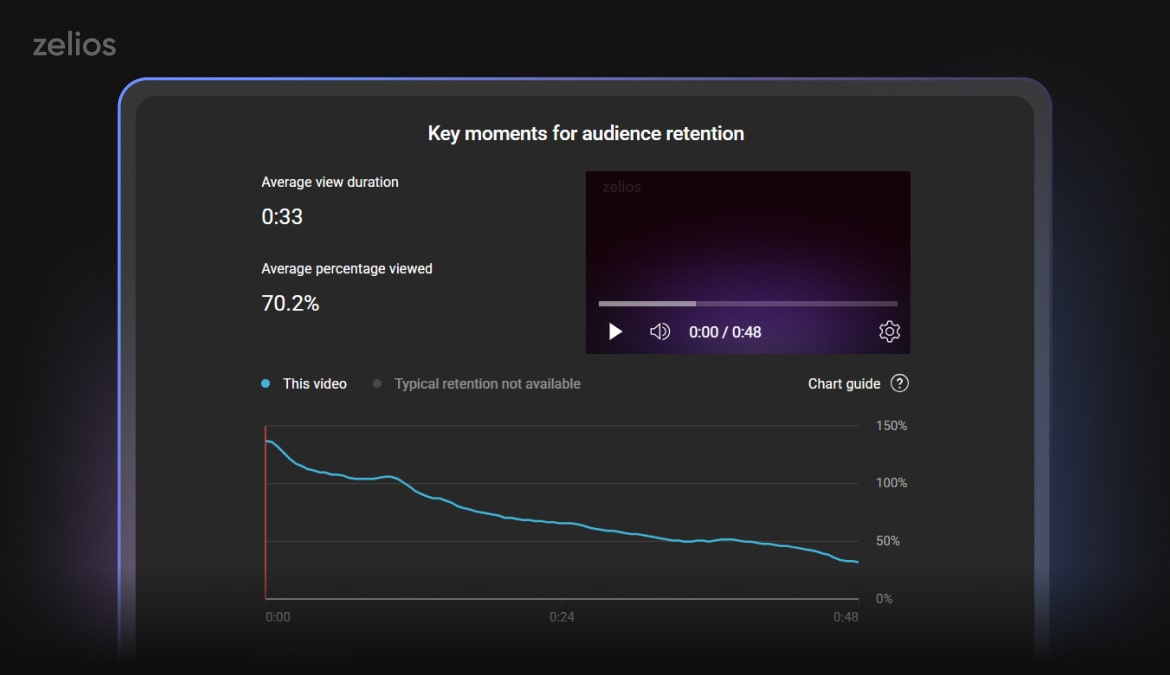
And your video hook is the thing that will be viewed by all viewers clicking on the video, and as the stats show, even reviewed on repeat for a couple of times:
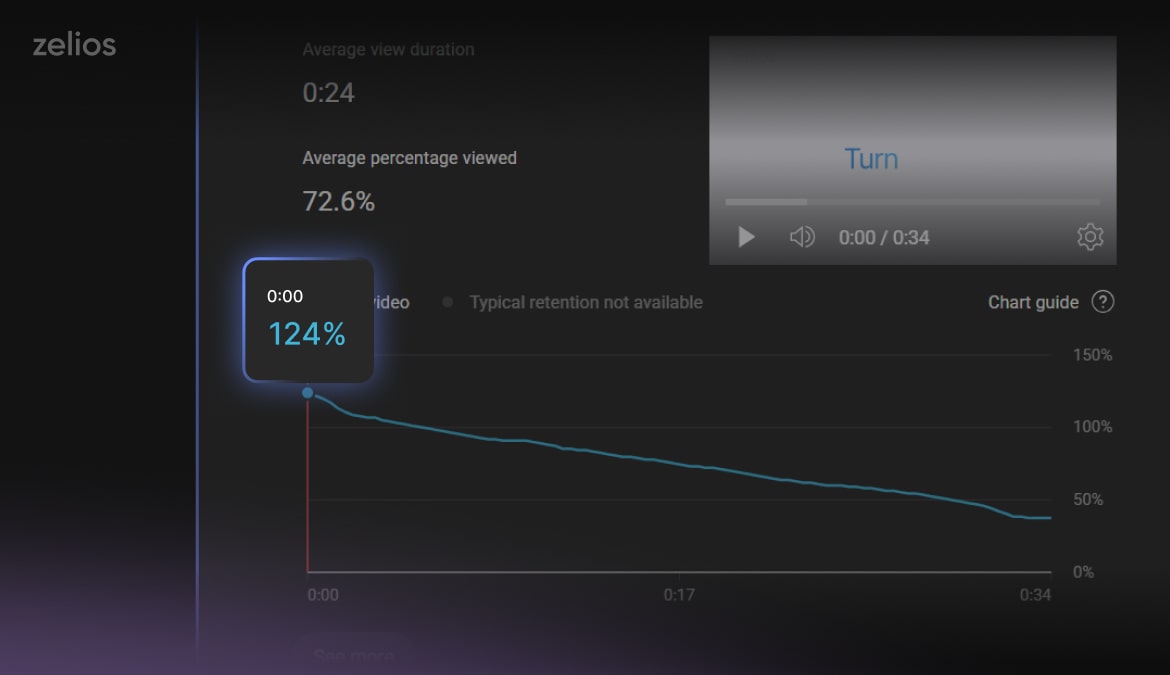
So, we’ve established how important the hook is nowadays. Here are a couple of hook structures and examples you can reference:
- Category Confrontation: This is one of the classic approaches, highlighting the pain point of your audience. This is also exactly why you should niche down and understand your ICP on a deeper level, as it allows you to target their pain points more precisely. Something like: “Stop stitching tools together just to ship.”
- Outcome Promise: This one is also known as “Dream state”. Often used to show the dream workflow or state they can achieve, and then showing them the “Pain Point” that prevents them from achieving it, and then showing how your solution will come in to fix everything. A good example is: “Ship features 3× faster — without more engineers.”
- What-If Question: This is often used to inspire curiosity, especially with something like a brand teaser that wants to spike curiosity without getting into the weeds of how the product works, or overshare at the current point. As an example: “What if your browser thought with you?”
- Spiky Data Point: Hit them with the stats that work for their niche, and that they wake up in cold sweat thinking about – this is a good “Show, not tell” approach, but should be based on solid data backing it up. For example: “Teams waste 11 hours/week copying data — until now.”
 Tip:
Tip: One Clear Promise
This is coming back to our point of people making their short teaser as small explainer videos. Pick just one transformation or dream outcome, or your message will get out of focus and sloppy. What you should be thinking about, is showing what changes for your users in the next 30 days, once they enroll with your product.
Examples:
- “Invoices reconcile themselves.”
- “Forecasts your pipeline before your rep logs in.”
- “Design to production—without handoff drama.”
Tip: 
A Signature Visual Moment
You need at least one pivotal, unmistakable visual that brings the “wow” effect or a eureka! moment in their minds – which is as clear as day even without the narration.
One of the classic visuals of all time for SaaS products – is the messy spreadsheets, Google docs, and other items flowing into one clean, centralized dashboard. Often creatives try to avoid this, to not be cliche – but it’s used a lot because it’s super recognizable. So make sure you use visuals that evoke this.
To call back to our IbanPay video – here’s how the email transforms into a ready made invoice, in a smooth motion.
The “ask AI” moment is a good example of a signature visual moment in our video for Doks.ai
When you look at our LangEase and IBanPay video – you clearly identify these pivotal points. For LangEase, it’s the morphing asset going into the design, and sound effect of coming into the “tunnel”. For IbanFirst, it’s when the invoice gets sent in a dynamic 3D motion, signifying the ease of workflows.
This is how you get your product inserted into the psyche of your customers.
Social Proof Flash (0.5–1.5s)
Credibility is a two edged sword, and especially smaller teams and start ups, should be cautious. If you have a solid track record – by all means, include it. It can compress decision making time, if you have the right pull and right companies already onboard to attract your ICP.
But make sure they don’t muddle your message, as you don’t have a long runtime in the teaser video.
Some of the more popular name drops and social proof flashed come in the elegant form of the following examples:
- Beta waitlist count (“8,412 on the waitlist”)
- Recognizable logo bar (even “ex-[Company] built this” helps)
- Credible stat from a pilot (“Cut support tickets 32%”)
- Short testimonial fragment (“‘Finally, invoices on autopilot.’”)
But even if you do use it in your teaser production – don’t make them overbearing and too on the nose.

Brand Cue + Memory Anchor
When people view one piece of Slack content, they know that it’s the Slack video – and it’s the same with Apple or when Gemini drops one of their brand videos.
So on this topic – what is “You” when it comes to motion? Do you have a distinct feel? Especially early stage companies, and believe us, a ton of established brands – don’t have a distinct motion language. And since every department has their own mind and vendors, the video content becomes a patchwork of different freelancer & agencies works. Not good – especially with product teasers.
To combat this, smaller brands can do what’s called “strategic association” and piggy back off the established styles of bigger brands. And since brands like Gemini and Apple poured millions in marketing budget in their branding & motion, if done right – you can get all of the boons without the overhead.
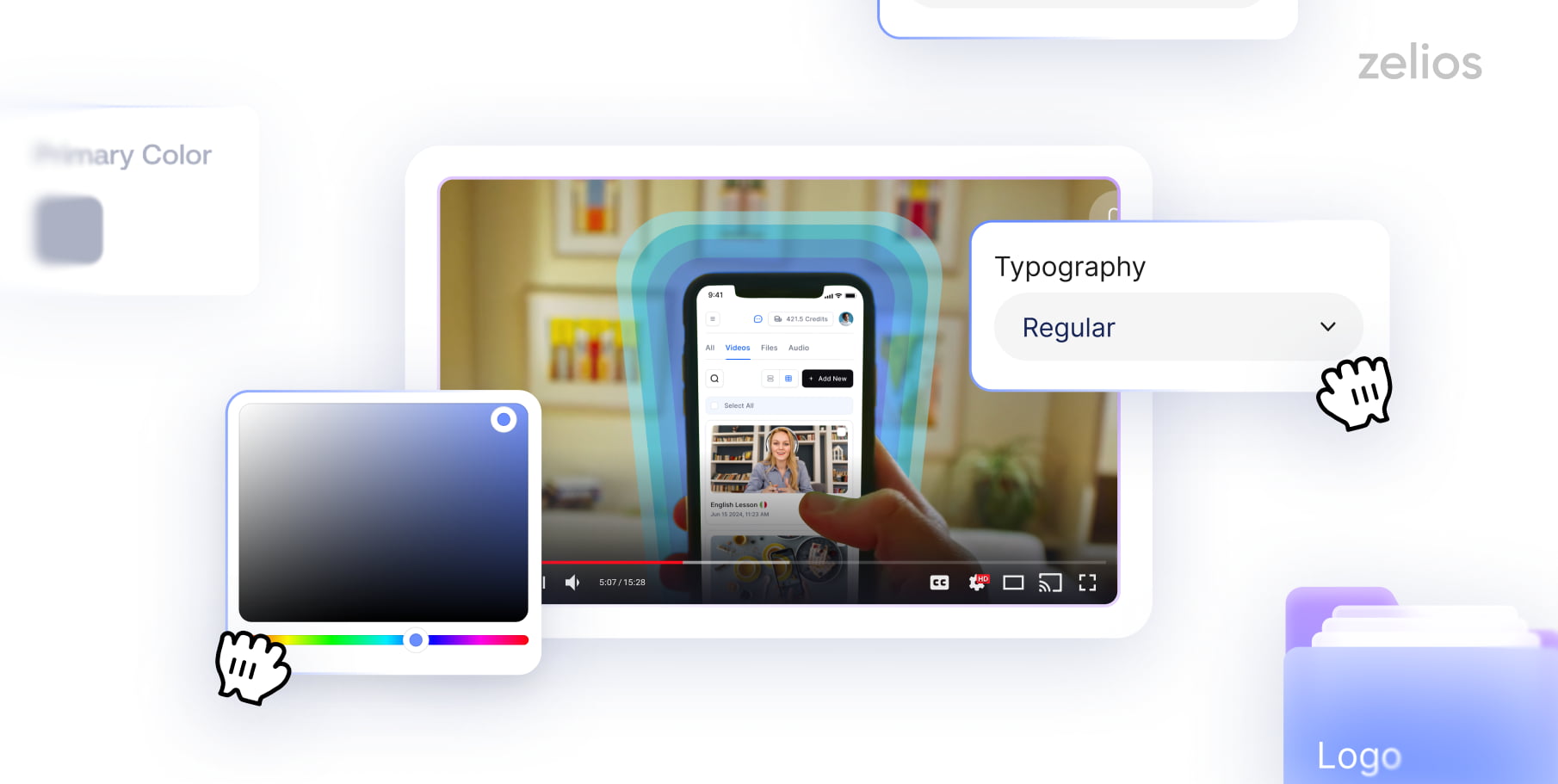
For bigger brands – it’s time to do the hard thing and build your own motion guidelines, which include:
- This may come in a consistent motion language, around transitions, and typography, motion motifs, music and even voice over choices.
- UI/UX flow, how sharp and fast the speed of motion is, what design philosophy is used.
- Distinct type pairing and micro-grid.
- Use the same cues across cutdowns so your brand “reads” instantly at 1× or muted.
What you will see with our video for LangEase – is that while they all have a different purpose, from Brand story, to Product Launch Ad and even Corporate Ad – is that they have an uncanny consistency in the small things – even in how the cursor is the same across all UI interactions of all videos.
That’s why in Zelios, we offer motion brand guidelines, to make sure all of your brand’s videos stay consistent and on brand – even if you do them with a freelancer. This is a plug and play system for your future motion projects.
Format Discipline (Make It Travel)
One of our pet peeves is when companies don’t help themselves with additional resizes. A great video is already made – why don’t go an extra step and let it be chunked down and adjusted for different use cases? Instead, what we see is using a single video for every usage, and sometimes assisted by horrendous blurred sides format for Instagram.
By making your content in native versions & technical specs for various platforms, you ensure their organic reach.
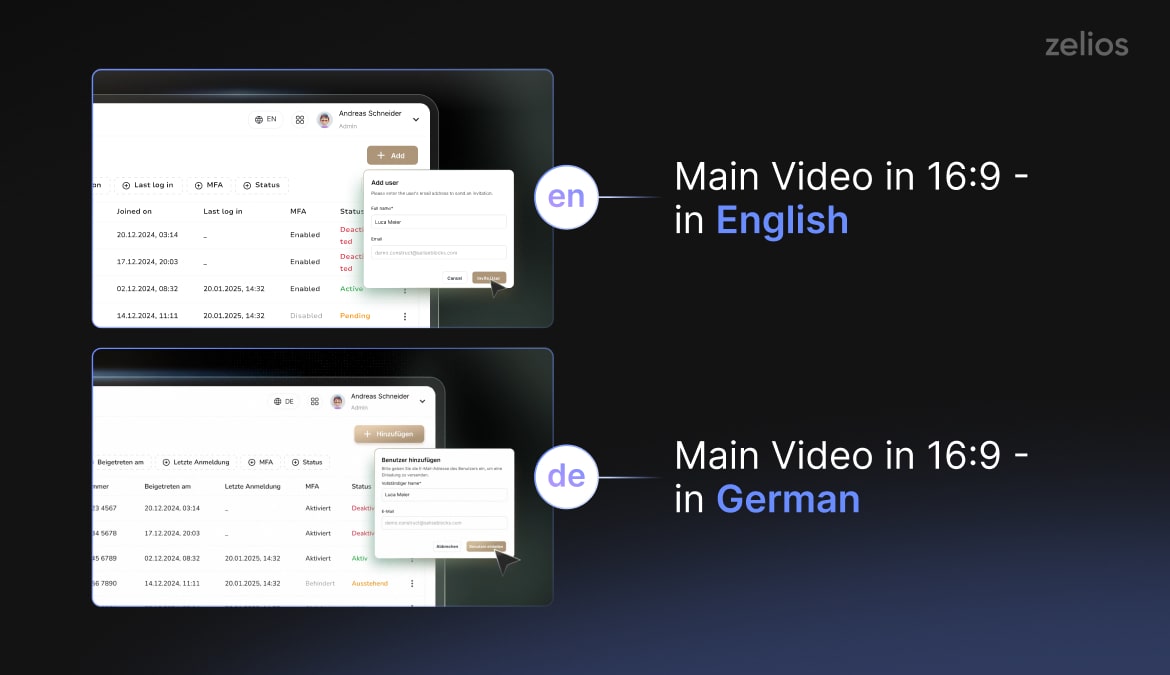
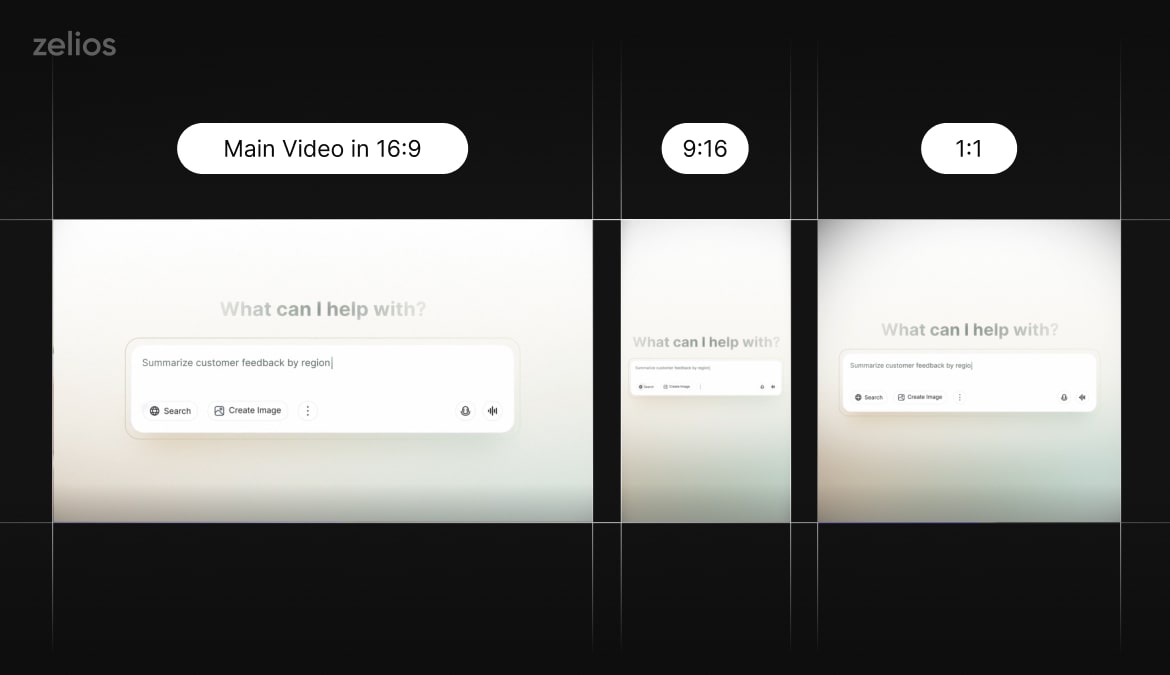
For one of our recent videos for EagleGPT, this came in a form of multiple things:
Main Video in 16:9 – in English ; Main Video in 16:9 – in German
And various resizes in 9:16 and 1:1
So, here’s a checklist to 11x your video:
- Lengths: 6–10s (ads), 10–15s (organic/ads), 20–30s (homepage/press) – covers most of your lead generation needs at the top of the funnel;
- Ratios: 9:16, 1:1, 16:9 – covers 99 percent of placements where you might use your teaser video;
- Captions: your teaser videos should be text on screen first as most of the attention will come from cold traffic, and leads stumbling on your video in their feeds, for example in the LinkedIn feed.
- First Frame: should be tailor made specifically for the video to increase the pull – this should become the extension of the hook. Here’s how it looks on our YouTube with a custom frame:
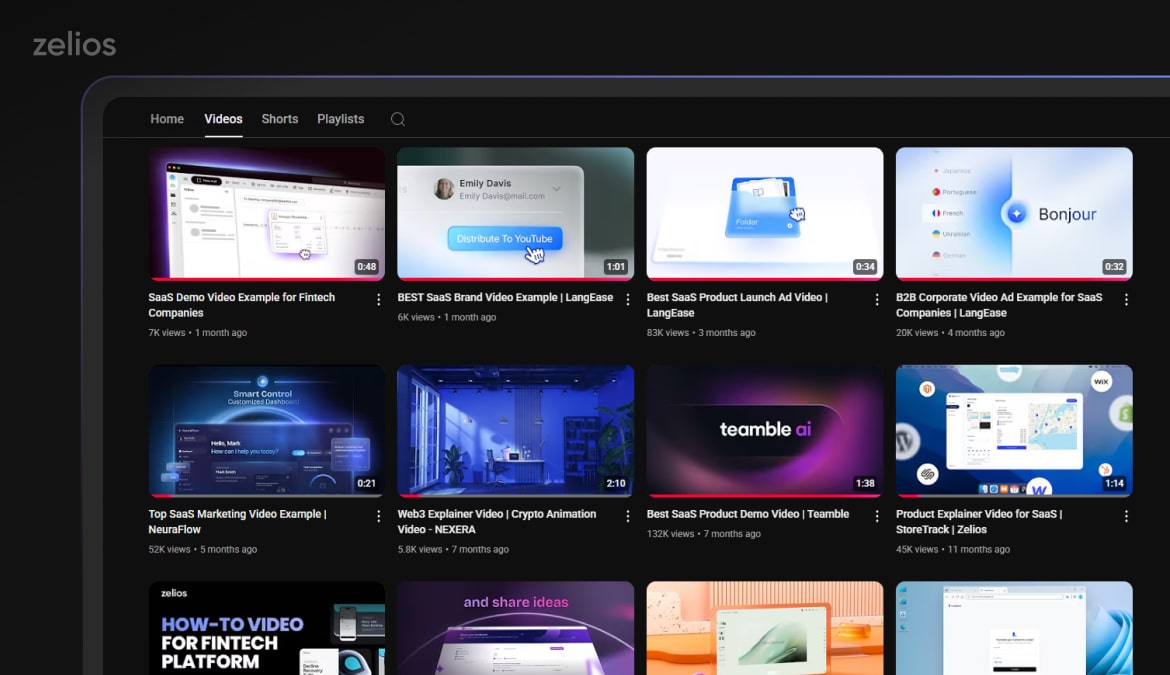
Make sure that you don’t just create a single teaser and call it a day. By expanding into different sizes and cutdowns, you set your teaser up for success by ensuring more organic reach.
Script Skeletons (Fill-In)
Of course, we wouldn’t leave you without an overview of some classic formulas to build a solid teaser video – and some of these helped us generate hundreds of thousands of views across our YouTube channel, as well as helping build a healthy pipeline for our clients:
Pain → Promise → Moment → Proof → CTA
“Manual onboarding leaks growth. Automate it. [UI snap-to ‘Create Flow’ → live checklist done] Used by teams at [logo]. Join the waitlist.”
What-If → Moment → Promise → CTA
“What if planning closed itself? [Calendar auto-fills milestones] Plans that update as work happens. Request access.”
Tip: Production Guardrails
- Message > polish. What we see with our clients is the shorter the video, the harder it is to pin down the message, and that’s logical. But on the other hand, this becomes a marketing exercise with immense value. Once you are able to digest your value prop and deliver it in 1 sentence, and then in 15-20 seconds – your messaging becomes much more precise and without fluff.
That’s why before any design or production is done, you need to have a solid script & concept foundation to then proceed with production – as no amount of great design & animation will save an unfocused message. - One idea per cutdown. This is all tied back to our initial point – that people perceive a teaser video as a small explainer. It’s not. You either build a larger ~60 second video, and cut it down into various adjusted cutdowns, or a variety of 15-30 second separate videos focusing on one idea.
- Design modularly. By doing this you are able to quickly adjust your video content for multiple use cases and occasions. Earlier, we’ve shared our EagleGPT example – and by using this approach, we were able to quickly resize, cutdown and even localize the video into German version from the original English one.
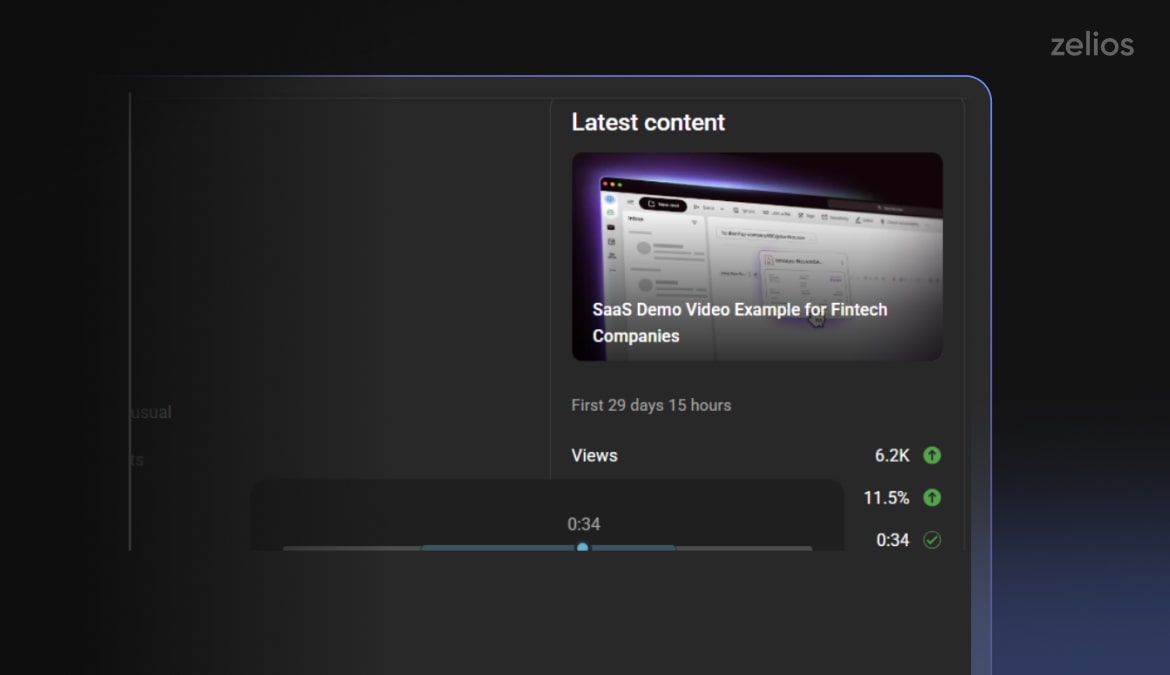
- Keep it short & sweet. If you can’t relay your idea in 15-30 second for a good teaser, it’s time to get back to the drawing board, especially since the typical watch time is only around 20-41 seconds:
Common Pitfalls
- Feature Dump Festa: dumping features at the users who are seeing you, most likely for the first time. Keep the teaser punchy and focused
- Two CTAs (paradox of choice): there should be only 1 logical path for them to take after watching the video – don’t botch it!
- Long logos up front (earn attention first): if it’s an Explainer video on your website, you can pull off having long intros and logos, but if you are drilling into the cold layer, you need to have something that grabs attention from the start.
- Cropping a 16:9 master into 9:16 after the fact (you’ll lose the hook): non-native resizes of original content detracts from its reach and organic viewership. If you are cropping a 16:9 master into 9:16, without adjusting the design and animation, most of the content will be out of bounds, or super small for the viewer. So before starting, it’s best to strategize around your use cases and make sure that you have additional formats for all of your placements.
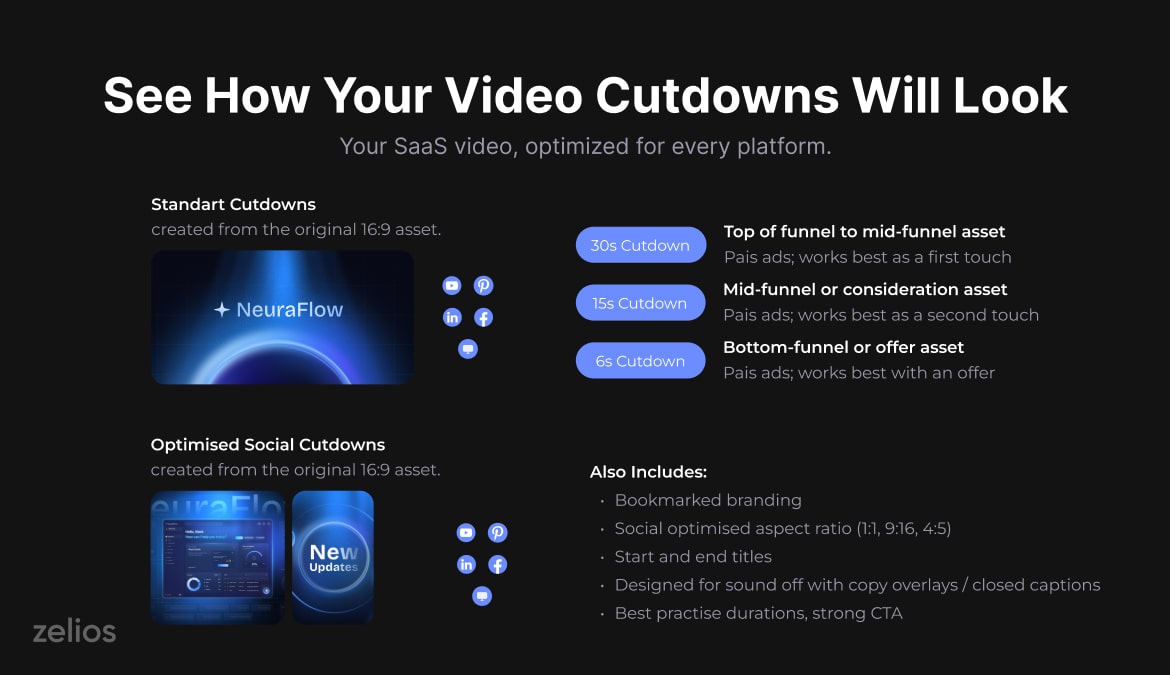
It’s really important to avoid these mistakes. From what we are seeing in our analytics, viewers are becoming more and more unforgivable to the video content, and with attention spans – it becomes a race to the bottom. We wonder if there’ll ever be a time when we return to a classic 90 second pitch format.
For now, that seems out of reach.
Bottom Line
If your goal is to produce an effective SaaS teaser to create curiosity and lower uncertainty, this can be achieved in under 30 seconds. For this, there are certain parts of the recipe that you need to nail down – sharp & catchy hook, one promise – and a signature visual to make your idea live in their head rent free, and then leading them towards the CTA.
If all of this is also wrapped with a consistent brand motion & style, paired with a variety of resizes and cutdowns to increase your reach – you ensure 99 percent of your campaign’s success.
Want us to help with your strategy for a single SaaS teaser or a teaser campaign? Reach out to us today to discuss the details.
Select the video type that aligns with your marketing objectives, and receive an immediate high-level estimate of the production cost.